INPUT 01 · ALL UPLOADS
Visual evidence
The browser reads color, brightness, colored coverage, and local texture around the pointer. These values are available even when the file has no geographic metadata.
Label: visual featureUpload an image or video, explore its visible pattern, and hear sound change as you move across it. When the visual has a known place and time, add measured ocean data. On supported phones, significant changes can also produce a short vibration; every device gets the same clear on-screen response.
The result card changes with the available evidence. Pixels, video motion, and API readings are separate types of information with different labels.
The browser reads color, brightness, colored coverage, and local texture around the pointer. These values are available even when the file has no geographic metadata.
Label: visual featureThe current displayed frame and its change from earlier sampled frames can control a pulse or rhythm. The user sees a normal video player, without a frame strip.
Label: visual motionA server request can add sea surface temperature and current speed or direction. Show units, UTC time, source, and the location used. The data is optional because uploads may lack those facts.
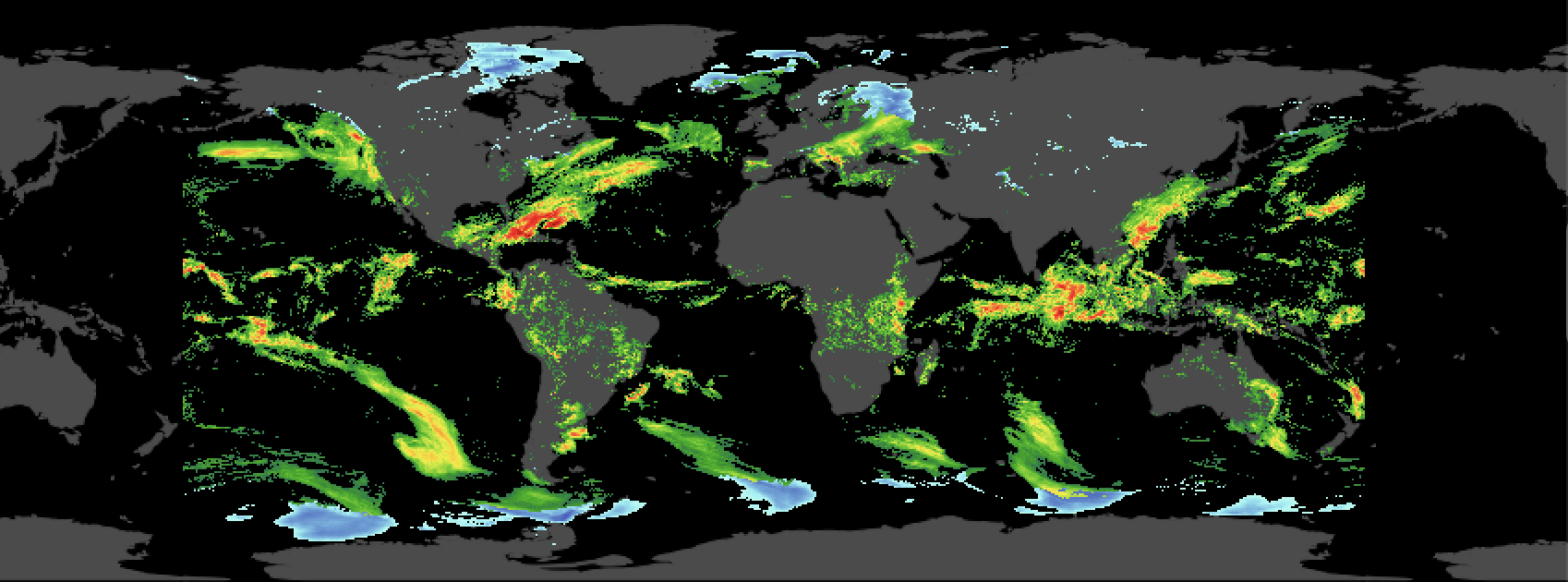
Label: provider valueScientific rule: a green line in an uploaded image is a green line. It becomes a temperature reading only when a verified legend or aligned source data supports that interpretation. The supplied crop resembles NASA SVS 3912, but its exact provenance and crop geometry remain unverified.
API requests occur when a source and its context are chosen. Pointer movement works locally in the browser and does not spend an API query.
Upload image or video, or open a credited NASA example.
Decode the media into a small hidden canvas and calculate visual features.
For known coordinates and time, request matching marine values from the server.
Hover, drag, tap, or use keyboard arrows over the same media stage.
Sound, readout, visual pulse, and supported phone haptics respond together.
If an API response is unavailable, the visual instrument still works and the measured data area says “No matched data.”
These variations build on Hume AI, fal, and Felt references, adapted for media, live values, sound, and touch.
Source at left, large media stage in the center, result and feedback at right. On phones, the result card follows the media immediately.
Media dominates the screen. A compact pointer label floats near the selected area while detailed results sit below.
The video and a synchronized feature plot sit together. Measurements and sound mappings form a separate inspection panel.
A / DESKTOP COMPOSITION
GREEN FLOW · SOUND 392 HzA / PHONE COMPOSITION
GREEN · 392 HzTouch holds the probe under the finger. The result stays visible immediately below the media.
Use the supplied map or a local image or video. This small report demo reads pixels, lets you switch sound styles, and gives visual feedback. Its instruments use built-in browser oscillators as stand-ins for a future ElevenLabs sample library. It is not a scientific temperature reading.
MOVE · DRAG · OR USE ARROW KEYSA single feature model drives all outputs. It includes the value, its provenance, units if any, confidence, location, and time; the screen never has to guess what it received.
| Stage | Data in | Processing | Data out / interface |
|---|---|---|---|
| Decode | Local image or video | Object URL, one media element, hidden downscaled canvas | Current pixel buffer |
| Probe | Pointer or touch position | Map through contained media bounds; average nearby pixels | Color band, coverage, brightness |
| Video time | Presented frame | requestVideoFrameCallback(); compare with prior sample | Local motion/change, media time |
| Optional marine | Known latitude, longitude, UTC time | Server request, validate JSON, cache by place/time | °C, m/s, degrees, source and time |
| Sound | Visual or measured feature | Clamp, normalize, map, smooth, schedule with Tone.js | Pitch, timbre, pulse, loudness |
| Feedback | Meaningful feature transition | Update readout and visual pulse; opt-in navigator.vibrate() when available | Same event understood on desktop and phone |
Key interaction decision: avoid a vibration on every pointer move or every video frame. Trigger a short, throttled pulse only for a meaningful transition, such as entering a strong current band. The sound can change continuously; haptics are discrete.
The NASA visualization and Meteomatics API play different roles. A NASA key is for applicable api.nasa.gov endpoints; the existing GIBS imagery is a public visualization service.
SVS 3912 depicts ECCO2 model output from March 2007 to March 2008. A current 2026 API reading must be presented as a separate context, not as the animation's measured value.
t_sea_sfc:C, ocean_current_speed:ms, and ocean_current_direction:d from a Next.js server route.The hackathon credentials are valid until 22 November 2026. Actual parameter and area entitlements remain unverified because this workspace could not reach the API.
Quota design: hovering samples local pixels, never the API. A low resolution area grid could support spatial interpolation, but Meteomatics documents area requests as a separate entitlement. Until the hackathon account is confirmed to include it, use explicit point requests and caching.
These mappings are proposed interaction choices, not claims about the underlying physics. The readout must always show which feature controls the output.
| Feature | Sound response | Visual response | Haptic response |
|---|---|---|---|
| Visual color band | Bounded note or instrument color | Probe ring and labeled swatch | One short pulse when the band changes |
| Visible motion | Pulse rate or modulation | Small moving level bars | Pulse only at a meaningful threshold |
| Measured sea temperature | Quantized pitch within a fixed range | Number, °C, source and time | Optional single pulse on entering a new band |
| Measured current speed | Rhythm density, bounded for comfort | Number in m/s and direction marker | Optional sparse pulse pattern |
| No data / land / silence | Fade to quiet | “No matched value” or “quiet area” | No pulse |
navigator.vibrate() is available only in some browsers and devices. Offer an explicit haptics switch, use brief pulses, throttle them, and stop on pause or exit. The API does not promise precise intensity or continuous textures.
Use the same live label, probe ring, and a small pulse indicator. Respect reduced motion settings. A desktop web page generally has no device vibration, so do not imply that the screen can physically shake.
People can hear the same visual or measured pattern through different instruments. Changing the instrument changes the timbre and arrangement; the source values and their labels remain traceable.
Short luminous notes for colored flow paths. Color controls note; motion controls note spacing.
Soft continuous texture. Temperature or color drives pitch; current speed or visible motion drives movement.
Rounded taps that reveal local changes without filling every quiet area.
Low rhythmic layer for strong currents, with sparse haptic accents on supported phones.
Use ElevenLabs Sound Effects on the server to produce several short, loopable candidates from each instrument prompt. Let the team audition and select the best sounds. Save the chosen audio, prompt, model, and mapping version as a reusable sample pack. The API supports a loop option and 0.5–30 second durations. Generate again only when a user explicitly asks for a new variation.
The prototype selector above uses browser oscillators; it does not claim to play generated ElevenLabs audio yet.
ElevenLabs Music Compose can create an instrumental background from a prompt. Its Video to Music endpoint can create a track from a video, but that sends the user's video to the provider and produces a rendered track rather than a responsive hover instrument. Offer it only as an explicit, separate creation action.
Keep the live probe and scientific readout operating in the browser while a generated track plays underneath.
Region profile: store the source ID, optional region/coordinates and UTC time, visual features, measured values and provider, selected instrument, selected sample variant, sound mapping, and haptic setting. A person can save “North Atlantic · Ocean strings · Variant 2” and switch to Glass keys without changing the underlying data.
Key handling: an ElevenLabs API key belongs in a server environment variable and is sent to ElevenLabs in the xi-api-key header. Create a restricted key with a credit cap. An ElevenLabs key is configured in the local ignored environment file; its access is unverified because this workspace cannot reach the API. Never put it in browser code or this HTML file. ElevenLabs authentication
The current Listen page uses NASA GIBS imagery and preset Tone.js notes. This redesign needs an analyzer, a selectable sound profile, and continuous controls before measured values can be meaningful in the interface.
Build upload, image/video preview, hidden pixel canvas, pointer and touch probe, stable visual features, sound smoothing, visible result, and keyboard operation.
Use a verified, credited source; identify map projection, crop, and animation time. Keep uploaded media clearly marked as user supplied.
Add server-side Meteomatics requests, validate entitlements and sample responses, cache results, then connect measured values to the same sound and feedback model.
Verify the locally configured ElevenLabs key and set its endpoint and credit limits, generate and audition several loopable variants per instrument, cache the selected assets, and let people save a region sound profile. Keep the browser sound engine responsive while the sample changes.
Links are to primary provider and browser documentation, with Mobbin screens used only as interface precedents.